
1. Import/copy course content from a previously taught course
Completion requirements
Navigate to the empty course shell for the new semester
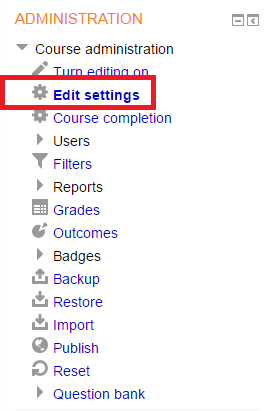
In the Administration block, under Course administration, click on Import.

Search for the course that has the course content you’d like to copy, and select the Search button or select the radio button by the course name and select Continue.

At the next screen, select the radio button by the course that you want to import, and select Continue.

You can now uncheck any content that you do not want to import. Once you have selected what you want to import, click on Next at the bottom of the screen.

Select Next at the bottom of the remaining screens to complete the import.
If you have any questions, please email moodle@lssu.edu.
Last modified: Wednesday, November 28, 2018, 2:24 PM